Welcome to the TheySix Discord
A practical map of the TheySix Discord: level roles, useful channels, downloads, and account-safety reminders.
Edit this article ↗The TheySix Discord uses a message-based level system. As you participate, you earn XP over time and unlock level roles. Each level role grants additional server permissions, and your role changes automatically when you reach a new level.
Level roles and access
- Wood, level 5+: add reactions.
- Copper, level 10+: send links and attach files.
- Redstone, level 15+: use external emojis and stickers.
- Amethyst, level 20+: change your nickname.
- Gold, level 25+: access the Aesthetics Designs worlds.
- Diamond, level 30+: access the Level 30 Club.
- Higher milestone roles continue through Emerald 40, Echo Shard 50, Sculk 65, Void Steel 80, Purpeille 95, Invasion 110, and Infinity 125+.
Where to find things
- Use bot commands for commands such as finding archived files.
- Server announcements, news, events, and updates are posted in announcements.
- Share Minecraft worlds in world sharing and find world files in worlds.
- Java schematic files are archived in schematics.
- Questions and common answers are collected in FAQ; read the server rules.
- YouTube notifications appear in YouTube notifications.
Make every channel visible
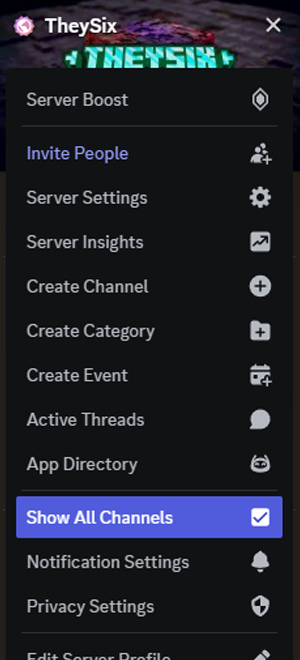
Discord can hide channels based on your account settings. Open the TheySix server menu and enable Show All Channels if world or schematic channels are missing. This is a client privacy setting, not a restriction added by TheySix.
Security reminder
Do not repeatedly join and leave the server, spam messages, or spam mentions. Automated security systems may flag that behavior as suspicious. The safest way to find a farm file is to use the documented bot command or the archive channels, not repeated joins or unsolicited pings.
The complete staff and community role list includes staff, design, creator, partner, edition, tester, and level roles. Roles such as VIP are booster roles; the role name itself is what matters, not the explanatory note sometimes shown beside it.